Install the Link plug-ins
CueConductor Link is a plug-in you insert on your session's main output. It streams the session's transport to the conductor's screen and every stand: sample-accurate, no MIDI setup, no timecode routing. One installer puts all formats in place.
Formats
| DAW | Format |
|---|---|
| Pro Tools | AAX |
| Logic Pro | AU |
| Digital Performer | AU (the AU2 component) |
| Cubase, Nuendo, Reaper and others | VST3 |
Install
- Open CueConductor on the Mac.
- In the Library tap Tips and choose Install the CueConductor Link DAW plug-ins…. The app also offers this on its second launch if no plug-in is installed.
- The macOS Installer opens. Approve it with your password. It places the plug-ins in the system folders and removes any older copies from your user folder.
- Quit and relaunch the DAW so it scans for new plug-ins. Digital Performer examines plug-ins at launch; a full quit and reopen is needed.
The app offers the installer again whenever a newer plug-in ships with an update.
Insert it
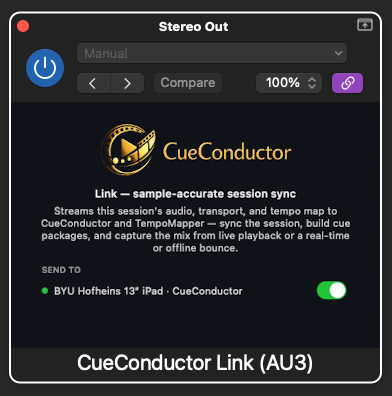
Insert CueConductor Link on the session's main output, the Stereo Output in Logic. Logic idles plug-ins on empty tracks, so an insert elsewhere may not run while the transport is parked.
The plug-in window has a SEND TO list of every CueConductor on the network. A green dot means connected. Tick the devices that should receive the session; by default all of them do.
If it doesn't work
- The DAW refuses the plug-in with "Apple could not verify…". It was copied by hand or by an old version of the app. Run the installer from the app; its copies are notarized and land without the quarantine mark.
- Pro Tools does not list it. Only the installer's AAX is PACE-signed. Check
/Library/Application Support/Avid/Audio/Plug-Ins/forCueConductorLink.aaxpluginand rescan. - The SEND TO list is empty. The devices must be on the same network as the Mac, or connected by USB cable, with CueConductor open.